Watching the Bundesliga in 4K on your screen — a match-night guide
Bayern Munich, Borussia Dortmund, Bayer Leverkusen, Leipzig — the Bundesliga is known for goals, full stands, and a convenient slot: Saturday afternoon in Gulf and Egyptian time. This guide gets your device and connection ready for the full Saturday round, and explains what actually decides picture quality.
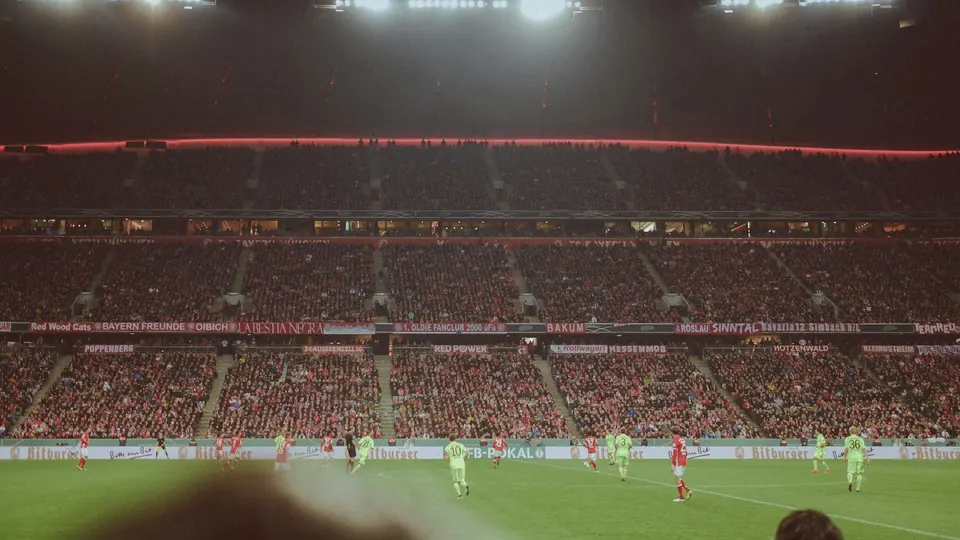
Why the Bundesliga suits anyone who watches at a comfortable hour
The main Bundesliga slot starts in the German afternoon on Saturday — afternoon in Egypt and early evening in Saudi Arabia, hours before peak home internet use. That makes it the ideal competition for watching together at home, or for high quality on an uncongested network. But a round means several matches in the same slot, so if you want to switch between them, or follow one on the TV and another on the phone, preparing the devices and the network in advance is what keeps switching smooth instead of turning into a reload every time.
Der Klassiker and Dortmund evenings
Bayern Munich against Borussia Dortmund — Der Klassiker — is the match of the season in Germany, and it is often played in a separate evening slot away from the rest of the round. Evening matches on Friday, Saturday and Sunday fall later in your time zone, so treat them like any big match: test playback an hour before, pause everything that uses the network at home, and start on a quality that has proved stable.
Switching between matches in a round
If you follow more than one match in the same slot, add the channels to the favourites list in your player app before the round, so switching is one press instead of a search. On a phone, turn on picture-in-picture where available to keep a second match running while you use other apps.
How to watch the Bundesliga on each device
- Smart TV (Samsung / LG / Android TV / Google TV)
Open the TV’s app store, install a compatible player app, then enter the subscription details you receive after payment. Start on automatic quality and raise it once the connection proves steady.
- Fire TV Stick and Android devices
Install the app from the Amazon or Google Play store, enter your details, and pin the app to the first row of the home screen so it is one click away on match day.
- iPhone, iPad and Apple TV
Use a compatible player from the App Store, and turn on picture-in-picture where available so the match keeps playing while you use other apps.
- Computer and laptop
Play through a compatible desktop app or a player that supports playlists. Use an Ethernet cable where you can — steadier than Wi-Fi on match nights.
The right internet speed for Bundesliga matches in 4K
We suggest 15 Mbps for high definition and 30 Mbps for 4K channels. What matters is the speed that reaches the viewing device itself, not the figure on your internet contract. An Ethernet cable or 5GHz Wi-Fi gives the steadiest result.
Saturday-round checklist
- Test playback at least an hour before kick-off, not a minute before it.
- Pause downloads, games and video calls on the same network during the match.
- On Wi-Fi, move closer to the router or use the 5GHz band at short range.
- Start in HD and switch to 4K when the connection holds — higher quality needs more data.
- Keep your subscription details private; never share them in public groups.
- If it stutters: restart the app first, then the router, then switch bands — one change at a time.
Fixing buffering during Bundesliga matches
Usually congestion on the home network. Pause downloads, move the device closer to the router, and drop the quality one step for a while.
Restart the app. If it persists, switch the video player in the app’s settings where that option exists.
Try another channel first. If nothing plays, it is the connection or the details — message us on WhatsApp with your device and app.
Final quality depends on the source, your screen and your connection speed. Make sure the app is set to its highest quality and the connection can carry it.
Bundesliga viewing — frequently asked questions
When do Bundesliga matches kick off in Saudi and Egyptian time?
The main slot is Saturday afternoon in German time — afternoon in Egypt and early evening in Saudi Arabia — with evening matches on Friday, Saturday and Sunday. Check the official time for each match and convert it to your time zone.
Can I watch the Bundesliga in 4K on a Smart TV?
Playback can reach 4K depending on the source, your screen and your connection speed. Set the app to its highest quality and make sure the connection delivers a steady 30 Mbps at the TV itself.
How do I follow more than one match in the same round?
Add the channels to favourites in the app before the round for quick switching, or follow one match on the TV and another on the phone over Wi-Fi. Playback is on one device at a time — if you need more, ask before ordering.
The stream stutters even though it is not peak time — why?
Check the Wi-Fi first: distance from the router or interference from other devices shows up at any hour. Move closer to the router, use the 5GHz band or connect a cable, and restart the app.
How many devices can play at the same time?
We help you set up on two devices, with playback on one device at a time. If you need more than one screen on match night, ask before ordering.
Is the Bundesliga included in the plan?
Competition availability varies by source and plan. If the Bundesliga is the reason you are subscribing, message us on WhatsApp and we confirm the details before you pay.
Competition and channel availability varies by source and plan, and picture quality and stability depend on your device and connection speed. If one competition is the reason you are subscribing, ask us about it on WhatsApp before you order.
Ready for the Saturday round?
Pick the subscription length that suits you and we will help you set up your device before the first match.
Read next
 Subscriber guideIPTV subscription in Austria: the complete guide before you buy — internet, devices and timing
 Subscriber guideIPTV subscription in Germany: the complete guide before you buy — internet, devices and timing
 Viewing guideWatching Serie A on your screen in high quality — a match-night guide
 Viewing guideWatching Ligue 1 on your screen in high quality — a match-night guide
 Family guideFamily viewing: kids’ lists, a PIN lock, and channels organised for everyone at home
 Viewing guideWatching the Saudi Pro League on your screen in high quality — a match-night guide