Fire TV Stick, Android box or Apple TV? Which external device to buy for your TV
An older TV with no suitable store, a smart screen whose app is slow, or simply wanting more flexibility — in all three cases the answer is a small external device on an HDMI port. But which one? This guide honestly compares the three most common options by what actually matters to you: ease, storage and memory, connection stability, and the apps available on each.
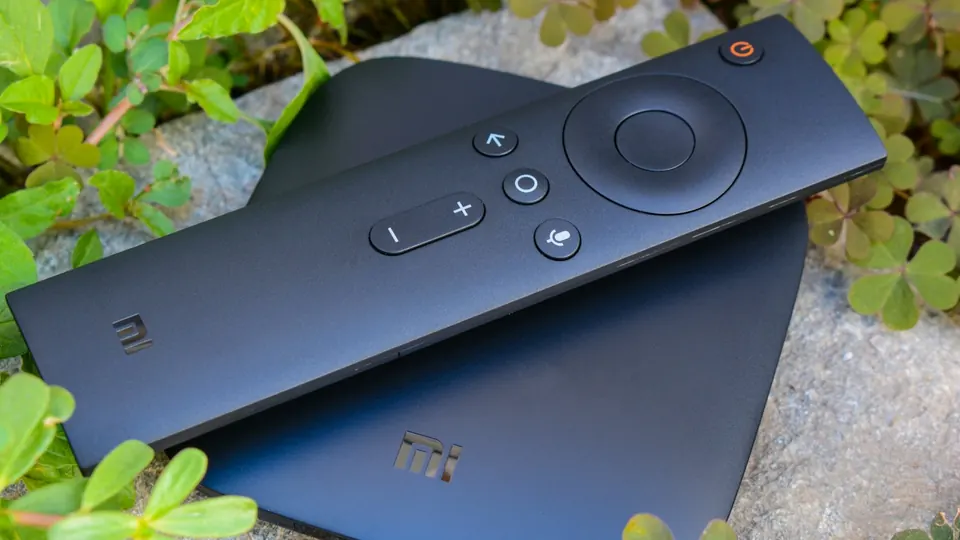
Why an external device solves smart-TV problems
Because the external device uses the TV only as a screen and brings its own system, store and memory. Older smart screens have limited memory, their updates stop after a few years, and their stores lose apps over time. An inexpensive device gives you a modern system updated for years, a wide store, and our official apps directly. And quality is unaffected: the same picture passes over HDMI at the highest resolution your screen supports. And once the device is chosen, the app-choosing guide completes the picture.
Fire TV Stick: the first choice for most homes
The smallest and cheapest of the three, running Fire OS and accepting our official apps through Downloader with a short code from the apps page. Setup takes minutes, and the remote works by voice. Its limits: it relies on Wi-Fi (an Ethernet adapter is sold separately), its storage is limited, and it can run hot behind the TV in a Gulf summer, so it needs ventilation. The 4K version is the one for 4K screens; the basic version is enough for HD screens.
Android box: more storage and a cable connection
A small box running Android TV or Google TV, usually with an Ethernet port and more storage and memory than a stick. It accepts our official apps through Downloader and the Google Play store alike. Best for those who want the stability of a cable, run many apps, or want storage for recordings. Beware of cheap no-name models: choose a known brand with official Android TV (the Android TV guide), as modified versions are not updated and show app problems.
Apple TV: the steadiest and priciest
The fastest and steadiest of the three, with an Ethernet port on the higher model and long-term updates. But it accepts only the App Store: no Downloader and no official apps, so you run the subscription with an Xtream Codes-compatible player from the store. Suited to those who own Apple devices and want AirPlay and one interface. It costs several times a stick, and the difference in quality is zero — the difference is smoothness and lifespan.
The comparison on what really matters
- Price: Fire TV Stick cheapest › Android box › Apple TV priciest.
- Ease of setup: Fire TV Stick › Apple TV › Android box.
- Our official apps: Fire TV Stick and Android box yes (Downloader) › Apple TV no (an App Store player).
- Connection stability: Android box and Apple TV (Ethernet) › Fire TV Stick (Wi-Fi, or an adapter).
- Storage and memory: Android box and Apple TV › Fire TV Stick.
- Heat and ventilation: the stick needs more attention behind the TV.
Which device for which situation
- An older TV and a modest budget
A Fire TV Stick in the version matching your screen’s resolution. Setup in the Fire TV guide.
- Weak Wi-Fi or a TV far from the router
An Android box with an Ethernet port, or a Fire TV Stick with an Ethernet adapter.
- A home full of Apple devices
An Apple TV with a compatible App Store player. Setup in the Apple TV guide.
- Many apps and storage
An Android box from a known brand with official Android TV.
- More than one TV at home
A device per screen; we help you set up on two devices, with playback on one device at a time.
The connection matters more than the device
The pricier device cannot make up for a weak connection. A steady 15 Mbps for high definition and 30 Mbps for 4K, measured on the device itself. If Wi-Fi is weak at the TV, a cable (or an Ethernet adapter) changes the experience more than changing the device.
Before you buy
- Know your screen’s resolution: 4K needs the 4K version of the device; HD is fine with the basic version.
- Check for a free HDMI port near a power source.
- If the router is far: choose a device with an Ethernet port or buy the adapter with it.
- Choose a known brand with an official system; avoid no-name boxes.
- Message us before buying if in doubt — we tell you the best fit for your case within minutes.
- Keep your subscription details private; never share them in public groups.
Common problems after buying
Change the input source to the connected HDMI port, and make sure the device is on mains power, not the TV’s weak USB port.
Use the short HDMI extender in the box to keep it away from the back of the TV, remove unused apps, and restart it between long sessions.
Modified Android versions are not updated and block some apps. The alternative is a device with official Android TV.
That is normal; Apple TV accepts the App Store only. Install an Xtream Codes-compatible player from the store — message us to recommend what is available.
External devices — frequently asked questions
Is a Fire TV Stick enough for a 4K screen?
The 4K version, yes. The basic version shows up to Full HD and is enough for HD screens.
Is quality on an external device lower than in the TV’s own app?
No. The picture passes over HDMI at the highest resolution the screen supports; quality depends on the source and the connection, not on where the app runs.
Which device accepts the official TV Strong 4K apps?
The Fire TV Stick and Android devices (boxes and sticks) through Downloader. Apple TV works with a compatible App Store player.
Do I need an Ethernet adapter?
If Wi-Fi is weak at the TV or stutter appears at peak time, yes — it changes the experience more than changing the device.
How many devices can play at the same time?
We help you set up on two devices, with playback on one device at a time. If you need more than one screen, ask before ordering.
Do you sell the devices?
We provide the subscription and the setup; you buy the device from any electronics store. Message us before buying and we recommend the best fit for your case.
Prices and models change by country and over time, and menu names differ between versions. Picture quality and stability depend on the source, your screen and your connection speed. Message us on WhatsApp before buying if in doubt.
Chosen your device? We set it up with you
Pick the subscription length that suits you, and once the device arrives we set it up with you step by step on WhatsApp.
Read next
 Setup guideSetting up your subscription on a Samsung or LG Smart TV — a step-by-step guide
 Choosing guideThe best IPTV app for a Smart TV and phone in 2026: choosing by your device, not by the adverts
 Viewing guideWatching films and series in 4K: what actually decides picture quality on your screen
 Setup guideSetting up your subscription on iPhone, iPad and Apple TV — a step-by-step guide
 Family guideFamily viewing: kids’ lists, a PIN lock, and channels organised for everyone at home
 Travel guideWatching while travelling: phone, mobile data and hotel Wi-Fi without surprises